


Divine
3.568.00 Reviews
App Specs
- Version
- 1.0.20
- Updated On
- License
- Free
- Downloads
- 10,000+
- Developer
- Verse Communication PBC
- Categories
- Social
- Platform
- Android
Screenshots
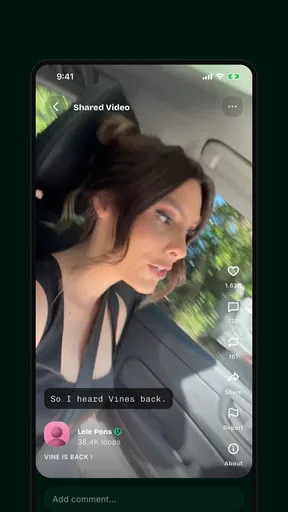
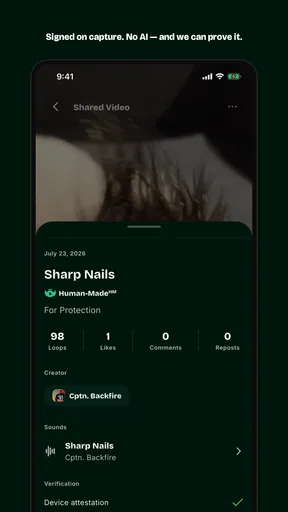
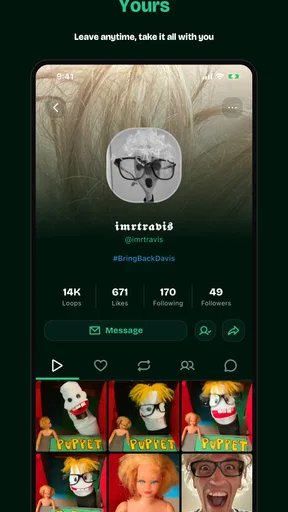
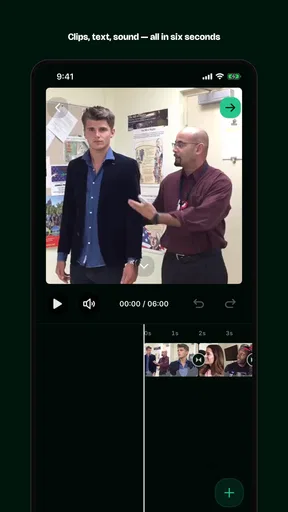
 Analysis by AppCompare
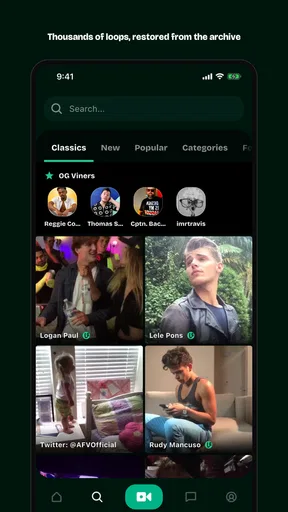
I approached Divine as a social app for people who want to share very small pieces of real life rather than produce polished, long-form posts. Its central idea is simple: short videos made by people, with each clip limited to six seconds. That constraint changes the way I think while using it. Instead of planning a full story, I look for one expression, one movement, one surprising detail, or one honest instant worth passing along.
That simplicity is appealing, but it also means the app depends heavily on how comfortable you are with fast, visual communication. I found the experience most interesting when I treated it as a place for quick observations, not as a replacement for every social network I already use. Divine is free, belongs to the social category, and is developed by Verse Communication PBC. It is aimed at mature users aged seventeen and over, so it is not an app I would casually hand to a younger teenager.
The public response is still relatively modest, with an average of around 3.5 from over 200 ratings and more than 10,000 installs. I read that as a sign to keep expectations realistic: this is a smaller community experience, not a huge, established video platform. The current version is 1.0.20, and it requires Android 9 or later. Those details matter if you are deciding whether it will fit an older phone or whether you want a broad audience immediately.
How Divine feels to read and navigate
The six-second limit gives the feed a clear rhythm. Every post is brief enough to understand quickly, and I rarely felt trapped in a long clip when I only wanted to browse. That is the strongest readability advantage here: the content unit is small. A user can decide almost immediately whether a moment deserves attention, which makes casual discovery less demanding than scrolling through longer videos.
At the same time, short video is not automatically easy for everyone to read. Meaning can disappear quickly, especially when a creator relies on facial expressions, movement, or a visual joke. If I look away for a moment, I may miss the entire point. People who process information more comfortably through text, captions, still images, or longer pauses may find the format tiring even when the interface itself feels uncomplicated.
I also noticed a difference between a visually simple concept and a fully readable social experience. A six-second clip can be concise, but it may still contain busy backgrounds, quick edits, low contrast, or details that are difficult to distinguish. The app’s premise encourages immediacy, so I would not assume that every post will communicate clearly to someone who needs more time or stronger visual separation.
For my own use, a helpful habit would be to slow down mentally rather than trying to consume the feed at maximum speed. I would watch a clip twice when the message is unclear, and I would avoid judging a creator’s post from the first instant alone. This is a small but useful trade-off: Divine rewards quick browsing, while thoughtful interpretation sometimes requires resisting the pace of the feed.
Worth Reading Before You Choose

Flipboard Shows What News Apps Must Do Beyond the Feed

Switching to Android Auto Means Rethinking Your Driving Routine

Google Calendar Makes a Crowded Week Easier to Manage

Ludo King Makes the Most of the Minutes Between Plans

Baby Panda World Brings Quick Play to Modern Phones, but Its Game Library Feels Busy

ESPN’s Live Game View Makes Following Close Games Easier
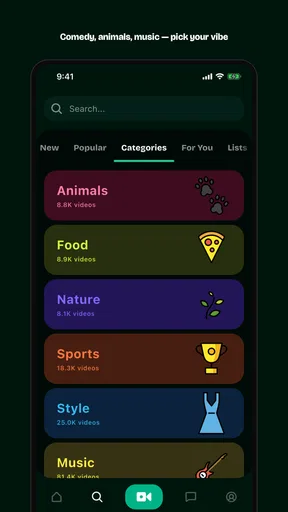
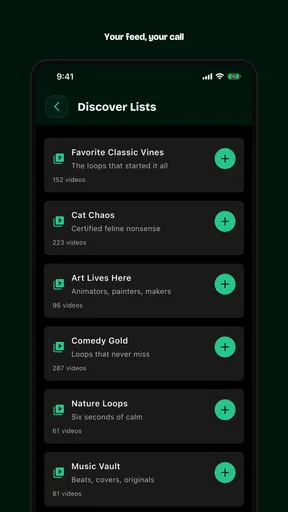
Navigation also depends on visual recognition. Social video apps commonly ask users to identify actions from familiar icons and gestures, and Divine’s short-form design naturally encourages that kind of interaction. That can be efficient for experienced smartphone users, but less comfortable for anyone who prefers explicit text labels or who has difficulty distinguishing small controls. I would spend a few minutes learning the main actions before trying to use the app one-handed or while distracted.
Why the six-second format changes participation
The short limit is not only a viewing feature; it shapes who can create comfortably. A person who dislikes speaking to camera may find it easier to share a glance, a small demonstration, or a single visual idea than to record a complete explanation. I can imagine using it to show a quick cooking detail, a pet’s unexpected behavior, a tiny craft step, or the atmosphere of a place without narrating a full story.
There is a less obvious downside. Six seconds leaves little room to correct misunderstandings. If a viewer cannot hear the audio clearly, misses a gesture, or does not recognize the context, the post may become confusing rather than authentic. Creators who want to discuss a complex subject, explain a personal experience, or provide detailed instructions should choose a longer video platform or a text-first community instead.
My practical advice is to design each post around one idea only. Trying to fit a greeting, explanation, reaction, and conclusion into the same clip makes the content harder to follow. A single action with a clear beginning is more likely to work. This is one of the app’s real creative constraints, and understanding it early makes the experience less frustrating.
Motor, sensory, and communication considerations
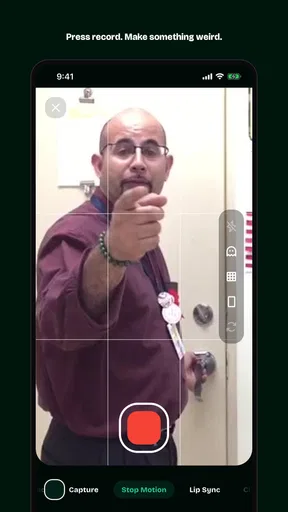
From a motor perspective, a short-video app can be approachable because the basic activity is familiar: hold a phone, frame a moment, record, and browse. The limited duration may reduce the pressure to maintain a long recording. Someone with limited stamina could potentially find a six-second contribution less demanding than producing a longer video, although the actual comfort will depend on the person’s device handling and the precision required by the recording controls.
That benefit should not be overstated. Recording still involves positioning the phone, starting and stopping at the right time, and possibly performing actions quickly enough to fit the format. If a person has tremors, restricted reach, fatigue, or difficulty with small touch targets, the app may be harder to use than its simple concept suggests. I would test the creation flow slowly in a quiet setting before relying on it for spontaneous posts.
A useful workaround is to prepare the scene before opening the recording action. I would place the phone securely, decide what single moment I want to capture, and only then begin. That reduces rushed movements and gives the clip a better chance of communicating clearly. It also helps people who need extra time to shift position or operate the device.
For sensory access, the visual brevity can be both a strength and a weakness. A short clip is less of a commitment for someone who becomes overwhelmed by extended video, but rapid motion, flashing changes, loud sounds, or crowded imagery can still make individual posts uncomfortable. Because the content comes from other people, the sensory experience will vary from one clip to the next rather than staying consistent.
Audio deserves particular attention. A six-second video may depend on a spoken phrase, a sound effect, or a reaction that is difficult to understand in a noisy room. Conversely, audio may be distracting or inaccessible for someone who needs a quiet environment. I would not treat Divine as an audio-independent experience unless each individual post communicates visually on its own.
For people who are deaf or hard of hearing, the value of a clip will depend on whether its meaning is visible without sound. A creator can make a gesture or visual event self-explanatory, but a spoken message without a readable alternative is much less useful. For people with low vision, the opposite problem can occur: a silent visual moment may be difficult to interpret without narration or a clear description. The app’s human-centered premise does not automatically solve these communication gaps.
Users with speech differences may appreciate that not every post needs spoken narration. A creator can communicate through movement, objects, timing, or expression. That makes the six-second format more flexible than an app built entirely around talking-head updates. Still, the social pressure to appear natural and immediate may discourage some people from participating, especially if they prefer editing, drafting, or adding context before publishing.
Using the app in real situations
Divine makes the most sense in small pockets of free time. I can picture opening it during a coffee break, watching a few human moments, and then sharing something simple from my own surroundings. The format suits a quick view from a walk, a friend’s amusing reaction, or a tiny before-and-after moment that would feel overproduced on a longer platform.
It is less suitable when attention is divided. On public transport, in a busy workplace, or while caring for someone, a rapid visual feed can be easy to start and difficult to follow responsibly. I would avoid recording when privacy, safety, or concentration matters more than sharing. A six-second clip may be brief, but capturing it can still expose people, places, or personal details that were not meant for a public audience.
Another realistic use is low-pressure social contact. A person who does not want to write a long update could share a tiny sign of their day: a view, a gesture, or a moment of humor. That can feel more personal than a polished photo while requiring less preparation than a conventional video post. However, anyone who needs dependable conversation, searchable information, or extended discussion will probably find a messaging app or text-based community more useful.
The age rating is important in everyday family settings. Since Divine is marked for mature users aged seventeen and over, I would not include it in a child’s unsupervised social-app rotation. Adults should also remember that “authentic” does not mean risk-free. Short clips can reveal faces, voices, locations, routines, and relationships very quickly, so I would think about what is visible in the background before sharing.
Because the community is still small, the social experience may vary by time and interest. A smaller network can feel less noisy and more personal, but it can also mean fewer posts that match your interests or fewer people who respond. If your main reason for joining is to reach a large audience immediately, a mature mainstream platform will likely be a better fit. If you prefer exploring an emerging, focused format, the smaller scale may be part of the appeal.
Where the experience still creates barriers
The biggest barrier is the tension between authenticity and control. Divine’s appeal comes from moments that feel immediate, yet users with accessibility needs often benefit from time, repetition, captions, descriptions, editing, and predictable presentation. The more a platform values spontaneity, the more carefully it needs to support people who cannot create or interpret content at the same speed.
I would also be cautious about assuming that every person can participate equally just because the clips are short. A six-second recording can require planning, steady framing, quick timing, and comfort with public exposure. Someone who needs a support person, assistive setup, or additional preparation may find the format less spontaneous than it appears to other users.
There is a social barrier as well. The phrase “humans only” suggests a focus on human-made moments, which I find appealing after seeing so much polished and automated content online. But authenticity can become another kind of performance. Users may feel pressure to appear natural, attractive, energetic, or constantly interesting. I would use the app on my own terms rather than treating the feed as a measure of how socially active or visually engaging I am.
Compared with longer video platforms, Divine is easier to sample but weaker for explanation. Compared with photo feeds, it captures movement and timing but asks more from the viewer’s senses. Compared with messaging apps, it offers discovery beyond close contacts but gives me less control over who sees the moment and how it is interpreted. Those differences are more useful than simply asking whether it is better or worse than alternatives.
If I needed captions, detailed descriptions, replayable instructions, or careful moderation tools for a specific community, I would choose a service designed around those needs first. If I wanted a private update to a friend, I would use direct messaging. Divine becomes the better choice when the goal is a tiny public-facing expression that benefits from motion and human presence without requiring a full production.
Since it is free, trying it carries less financial commitment, but time and attention are still costs. I would give it a focused trial: create a few single-idea clips, browse at a comfortable pace, and notice whether the feed remains understandable without sound or repeated viewing. That test tells me more than the short description because it reflects my own sensory and motor needs.
My inclusive verdict
I see Divine as a distinctive social experiment built around restraint. Six seconds is enough to make a moment feel immediate, but not enough to explain everything. That makes the app inviting for quick visual sharing and limiting for users who depend on context, text, audio clarity, or deliberate editing. Its strongest quality is also its main accessibility question: can a human moment remain understandable when it is compressed so tightly?
I would recommend it to adults who enjoy discovering small, unpolished video moments and who are comfortable communicating through quick visual posts. It may also suit creators who find long videos intimidating and want a lower-commitment way to participate. The best results will come from choosing one clear action, preparing the recording space, and checking whether the clip makes sense without relying entirely on sound.
I would suggest skipping it, or using it only alongside another platform, if you need detailed explanations, private conversation, dependable text access, or a slower and more predictable presentation. People with sensory sensitivities should approach the feed carefully because the content can vary widely. Users with motor limitations may appreciate the short recording length but still need a stable setup and extra time.
My final impression is positive but measured. Verse Communication PBC has made a focused product rather than another general-purpose social network, and the free entry point makes that idea easy to explore. The audience is still developing, reflected in its average of about 3.5, so I would join for the format itself rather than expecting a fully populated community. Divine is worth trying when you want to share one genuine instant; it is not the right tool when accessibility, privacy, or context requires more control than six seconds can provide.
Pros
- Simple interface makes daily use easy for new users.
- Content loads quickly on most modern devices.
- Useful notifications help users stay updated.
- Works well for short sessions on the go.
- Regular updates can improve stability and performance.
Cons
- Some features may require an account or personal details.
- Notifications can become distracting if left fully enabled.
- Older devices may experience slower performance.
- The app may use noticeable storage after several updates.
- Support options may be limited for troubleshooting.
FAQs for Divine
What is Divine, and what can I use it for?
Divine is an app designed to provide users with a focused digital experience, although its exact features may vary depending on the version and platform available. Before downloading, review the store description carefully to confirm whether it offers the tools, content, or services you need. Exploring the main sections after installation is also recommended so you can understand how the app is organized.
Is Divine free to download and use?
Divine may be available as a free download, but some features, content, or services could require in-app purchases or a subscription. Users should check the pricing information shown on the Google Play Store or Apple App Store before installing. Pay particular attention to trial periods, renewal terms, and whether removing the app automatically cancels an active subscription, as it usually does not.
Does Divine require an account or personal information?
Depending on the functions you want to use, Divine may ask you to create an account or provide details such as an email address, profile information, or preferences. Before registering, read the privacy policy and examine the permissions requested by the app. Avoid sharing unnecessary sensitive information, and confirm whether guest access is available if you prefer not to create an account.
Is Divine available for both Android and iPhone?
Availability can differ by operating system, country, and device model. Check the official Google Play Store listing for Android or the Apple App Store listing for iPhone and iPad to confirm compatibility before downloading. You should also review the required operating-system version, storage needs, and recent user feedback, since older devices may not support every feature or provide the best performance.
Is Divine safe to download and use?
The safest approach is to download Divine only from an official app store or a verified developer link, rather than from unknown websites or modified APK files. Before installation, check the developer name, permissions, privacy information, update history, and user reviews. Keep your device and the app updated, and be cautious if the application requests access that seems unrelated to its advertised purpose.


